💯 Percentage rollout
Overview
A percentage rollout refers to a gradual release of a new feature to a subset of users. Instead of making the feature available to everyone at once, you want to have only a subset of your customers to see the new feature.
Define a percentage rollout
In GO Feature Flag, you can define a percentage rollout by setting the percentage of users that will see the new feature. You can define the percentage in the flag configuration, and it works for the default rule or any other targeting rule you define.
The expected format is a map where the key is the variation name and the value is the percentage of users that will see this variation.
You can have as many variations as you want in the percentages, and you can define the percentage of users that will see each variation.
If the sum of your percentages is not equal to 100 this is not a problem, we are computing the affectation as fractional numbers.
example: if you have 2 variations and you set variation1: 10 and variation2: 50 it will be equivalent to variation1: 10/60 and variation2: 50/60.
How percentage rollout works?
GO Feature Flag uses a deterministic hashing algorithm to ensure consistent user assignment to variations. Here's how it works:
Hash computation
For each evaluation, GO Feature Flag computes a hash based on the targeting key (also called bucketing key) and the flag name:
hash = hash(targetingKey + flagName) % maxPercentage
This hash produces a value between 0 and maxPercentage (which is the sum of all percentages). The hash function ensures that the same user (with the same targeting key) will always get the same hash value for a given flag, providing consistent assignment.
Bucket assignment
All variations that are part of the percentage rollout are sorted by reverse alphabetical. This ensures consistent bucket assignment across evaluations.
For example, if you have the following percentages:
percentage:
  - varC: 20
  - varB: 30
  - varA: 50
After sorting by inverse alphabetical order, the buckets are assigned as follows:
- 0 to 20: assigned to
varC - 20 to 50: assigned to
varB - 50 to 100: assigned to
varA
The hash value determines which bucket the user falls into, and thus which variation they receive.
Since it is pure hash based, GO Feature Flag will always assign the evaluation context to the same bucket even if your evaluation is done on a different server or if you restart your relay-proxy.
Impact of changing percentages
When you have two variations, adjusting the percentages simply increases or decreases the number of users assigned to each variation.
This allows you to gradually roll out a feature in a predictable and straightforward way.
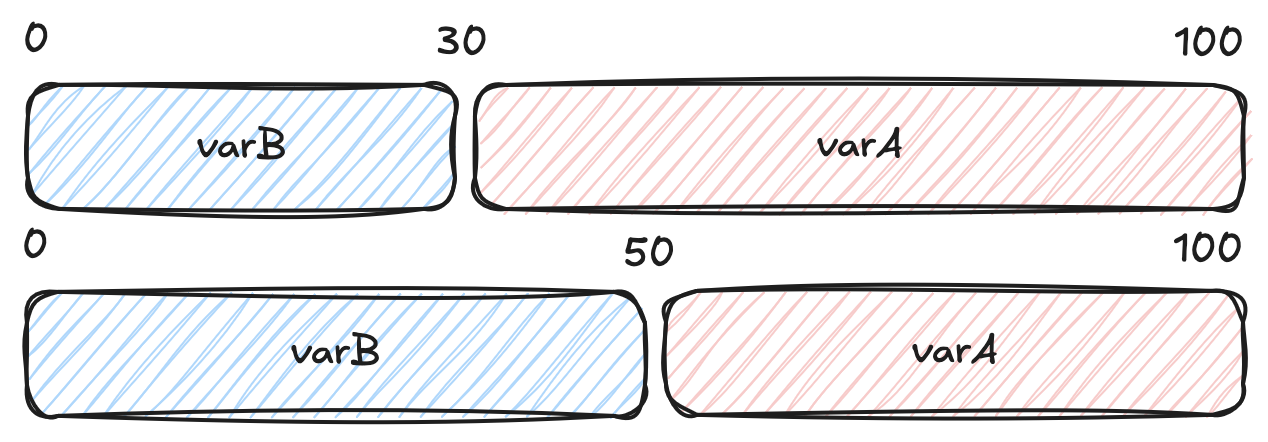
But if you have more than 2 variations, this can have an impact on how your bucketing works.
When you change the percentage configuration, all buckets are recalculated, which means users may be reassigned to different variations. This happens because the bucket boundaries shift based on the new percentages.
For example, if you change the configuration to:
percentage:
  - varC: 30
  - varB: 30
  - varA: 40
The new bucket assignments become:
- 0 to 30: assigned to
varC - 30 to 60: assigned to
varB - 60 to 100: assigned to
varA
As you can see in the diagram below, changing percentages shifts the bucket boundaries, which can move users from one variation to another:
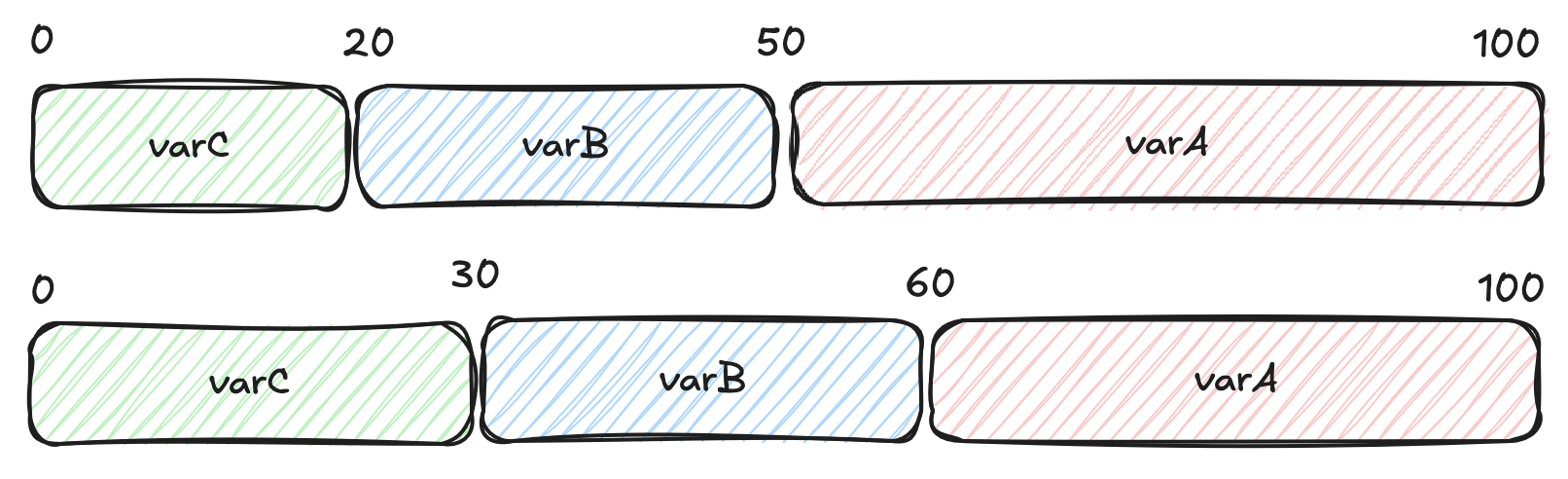
The deterministic hashing ensures that the same user will always get the same variation for a given configuration. However, when you change percentages, the bucket boundaries change, which may cause some users to be reassigned to different variations.
Examples
Define in the default rule
In this example 99% of the users will see the disabled variation and 1% will see the enabled variation.
percentage-flag-1:
  variations:
    disabled: false
    enabled: true
  defaultRule:
    percentage:
      disabled: 99
      enabled: 1
Define in a targeting rule
In this second example, 50% of the users that are admin will see the disabled variation and 50% will see the enabled variation.
Non admin users will see the disabled variation.
percentage-flag-1:
  variations:
    disabled: false
    enabled: true
  targeting:
    - query: admin eq true
      percentage:
        disabled: 50
        enabled: 50
  defaultRule:
    variation: disabled
🐥 Canary releases
Percentage rollout are also known as canary releases, where you release a new feature to a small subset of users before rolling it out to everyone.